 Disappointed Pakistani Fan
Happy Then Disappointed Reaction Meme Generator
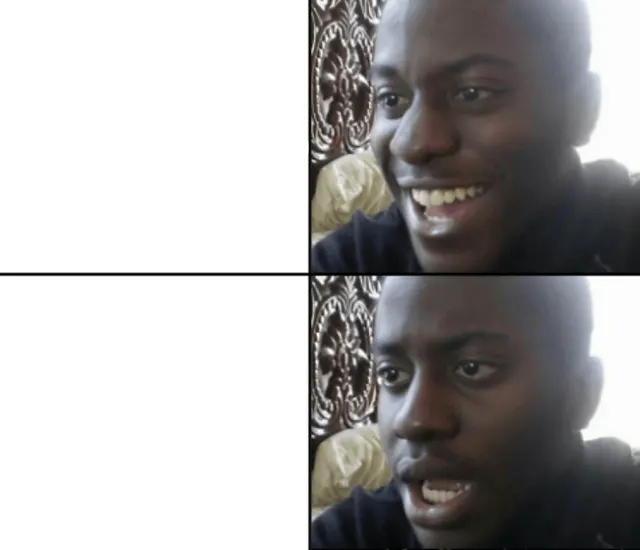
A two-panel reaction template showing a man smiling at first and then looking uneasy or disappointed after hearing the catch.
Drag a box to move it, or its corners to resize. Everything renders on your device — nothing is uploaded.
Meme lore
What is the Happy Then Disappointed Reaction meme?
This two-panel reaction template contrasts enthusiastic approval with a skeptical, disappointed follow-up reaction. Add a setup, announcement, or apparent good news to the top panel and reveal the downside, catch, or disappointing detail in the bottom panel.
Origin & history
The exact original source and spread history are unclear. The image is commonly used online as a generic happy-to-disappointed or expectation-versus-reality reaction format.
The template appears to be a cropped reaction image or screenshot featuring the same man in two consecutive expressions: a broad smile followed by a more doubtful and disappointed look. Its precise original video, photograph, and earliest meme usage cannot be confirmed from the image alone.
Caption this Happy Then Disappointed Reaction meme with your own text in the editor above, then download the finished PNG free — for Reddit, X, Instagram, WhatsApp, Discord or the group chat.
Best used for
- Someone announces free shipping, then reveals the minimum order
- Getting excited about a job offer before seeing the salary
- Hearing that a game is free, then discovering the subscription requirement
- Expecting a fun weekend plan and learning there is a catch
- Celebrating a shortcut before realizing it takes longer
Template details
- Size
- 1700 × 1462 px
- Download
- PNG
- Caption slots
- 2
- Layout
- Two Panel
- Panels
- 2
- Category
- Reaction
Step by step
How to make a Happy Then Disappointed Reaction meme
- 1
Open the Happy Then Disappointed Reaction template
The blank Happy Then Disappointed Reaction meme is already loaded in the editor at the top of this page. There is nothing to install and no account to create.
- 2
Write your captions
Type into the good news (top left) and bad news (bottom left) fields in the panel beside the image, or tap one of the example captions to start from a working joke.
- 3
Place the text
Drag a caption box on the image to move it, or drag a corner to resize it. The text rewraps and shrinks to fit as you go.
- 4
Download your meme
Press Download PNG for the finished 1700×1462 image, or Copy to paste it straight into a chat. Turn the watermark off first if you would rather not have one.
How the joke works
Put the hopeful setup or apparent good news in the top-left box, then put the catch, downside, or disappointing realization in the bottom-left box.
Tone: starts cheerful, ends wary and disappointed
expectation versus realityemotional whiplashbait and switchdelayed bad news revelation
Caption tips
- Keep the top caption optimistic and concise.
- Make the bottom caption reveal the downside or catch.
- Use short, conversational text that reads naturally from top to bottom.
AI studio
Let AI write the captions
Describe the joke once and get four captioned variants on the templates that fit it — then open the one you like in this editor.
Generate captionsFor agents
memeworld ships a REST API and an MCP server, so Claude, Cursor or your own agent can pull this template, caption it and render the image.
GET /api/v1/templates/happy-then-disappointed-reaction-796Agent docsHappy Then Disappointed Reaction meme generator FAQ
What is the Happy Then Disappointed Reaction meme?
This two-panel reaction template contrasts enthusiastic approval with a skeptical, disappointed follow-up reaction.
How do I make a Happy Then Disappointed Reaction meme?
Open the editor at the top of this page, type your captions, drag the text where you want it, and download the finished PNG. It takes about twenty seconds.
Is the Happy Then Disappointed Reaction meme generator free?
Yes. Captioning and downloading are free, there is no account to create, and there is no cap on how many you make.
How many captions does the Happy Then Disappointed Reaction template take?
2 captions: good news (top left) and bad news (bottom left). You can leave any of them blank, and you can move or resize each box on the image.
Where does the Happy Then Disappointed Reaction template come from?
The exact original source and spread history are unclear. The image is commonly used online as a generic happy-to-disappointed or expectation-versus-reality reaction format.
What file do I get?
A 1700×1462 PNG, ready to post to Reddit, X, Instagram, WhatsApp, Discord or the group chat.
Is there a watermark?
A small memeworld watermark is drawn in by default. Switch it off in the editor panel before you download and the export is clean.
Are my memes uploaded anywhere?
No. The renderer runs in your browser, so your captions and the finished image never leave your device.
Can an AI write Happy Then Disappointed Reaction captions?
Yes. Describe your joke on the Create page and memeworld writes captions onto the templates that fit it, ready to open in this editor. Agents can do the same through the REST API and the MCP server.
Related meme templates
Templates that share tags with Happy Then Disappointed Reaction — similar characters, formats and reactions, not just the most popular blanks.
Disappointed Pakistani Fan Aaaaand Its Gone
 Confused Travolta
 Caleb Williams Grimace Reaction
 Man Running From Mounted Police
 Willem Dafoe Looking Up
 Confused Nick Young
 Matt Eberflus Shocked Bears Sideline Reaction
 Allen And Lucan’s Shocked Reaction
 Michael Scott No God Please No
 Suspicious Fry
 Patrick Wallet
 Cute Cat Hehe and Not Hehe
 Kermit Waiting Four-Panel Collage
 Anthony Adams Rubbing Hands Behind Tree
 Gru's Plan 5-Panel Meme
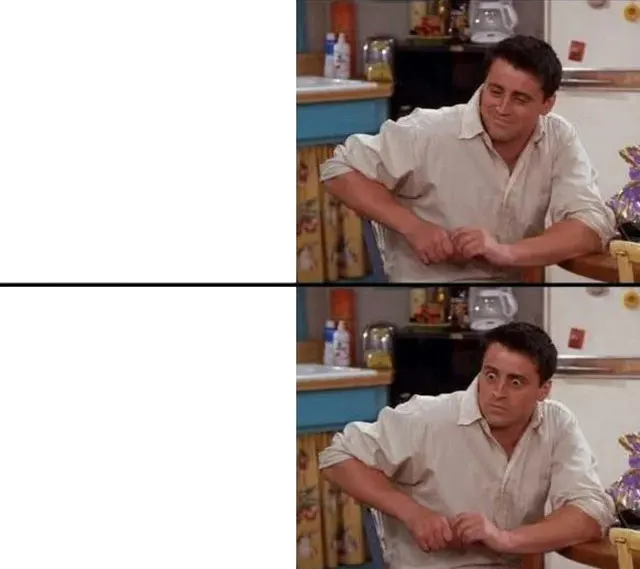 Joey’s Slow Realization
 Carson Wentz In Pain
 Ayatollah Khamenei Looking Up
 And Then I Said Obama
 Homer Doh
 Cassie “I Don’t Wanna Be Poor”
 Shut Up And Take My Money Fry
 Dean Norris Happy–Angry ReactionDisappointed Pakistani FanConfused TravoltaAnthony Adams Rubbing Hands Behind TreeWillem Dafoe Looking UpConfused Nick YoungAyatollah Khamenei Looking UpMichael Scott No God Please NoCassie “I Don’t Wanna Be Poor”Shut Up And Take My Money FryDisappointed Pakistani FanCaleb Williams Grimace ReactionWillem Dafoe Looking UpMatt Eberflus Shocked Bears Sideline ReactionMichael Scott No God Please NoSuspicious FryDean Norris Happy–Angry ReactionCute Cat Hehe and Not HeheGru's Plan 5-Panel MemeCarson Wentz In PainAyatollah Khamenei Looking UpHomer DohDisappointed Pakistani FanMan Running From Mounted PoliceCarson Wentz In PainAllen And Lucan’s Shocked ReactionShut Up And Take My Money FryCute Cat Hehe and Not HeheWillem Dafoe Looking UpMatt Eberflus Shocked Bears Sideline ReactionHomer DohAaaaand Its GoneCaleb Williams Grimace ReactionJoey’s Slow RealizationAnd Then I Said ObamaPatrick Wallet