 Orly Owl
Roblox Noob Meme Generator
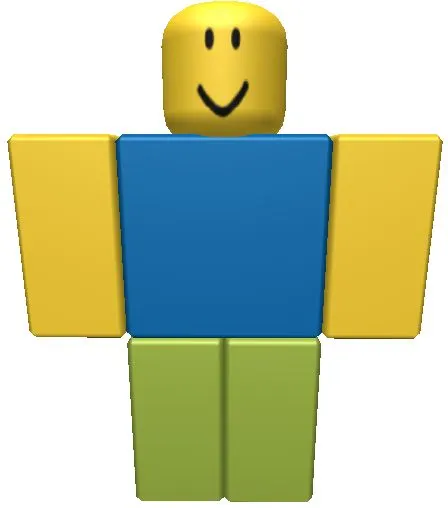
The classic yellow, blue, and green Roblox avatar, used as a cheerful blank-slate character for intentionally naive gaming jokes, noob labels, and OOF-style mishaps.
Drag a box to move it, or its corners to resize. Everything renders on your device — nothing is uploaded.
Meme lore
What is the Roblox Noob meme?
Roblox Noob centers the iconic blocky classic avatar against a plain white background. The character's simple smile makes confident-but-clueless captions land well, while the large blue torso and open space above and below support a short three-beat character joke.
Origin & history
The yellow-head-and-arms, blue-torso, green-legs color scheme is associated with Roblox's early default avatar figures from the platform's 2006 era. It later became a recognizable community shorthand for a new or deliberately old-school player; the first use of this exact rendered image as a meme template is unclear.
This image depicts the community-recognized classic Roblox noob look: a blocky avatar with yellow skin, a blue torso, and green legs. The character design comes from early Roblox avatar presets, but the creator and first publication of this exact render have not been verified.
Caption this Roblox Noob meme with your own text in the editor above, then download the finished PNG free — for Reddit, X, Instagram, WhatsApp, Discord or the group chat.
Best used for
- Giving a confident but inexperienced player a naive inner monologue
- Making a classic Roblox or OOF joke
- Labeling an intentionally basic or old-school gaming choice
- Turning a harmless mistake into a cheerful self-own
- Contrasting a simple avatar with an absurdly serious claim
Template details
- Size
- 448 × 508 px
- Download
- PNG
- Caption slots
- 3
- Layout
- Single
- Category
- Gaming
Step by step
How to make a Roblox Noob meme
- 1
Open the Roblox Noob template
The blank Roblox Noob meme is already loaded in the editor at the top of this page. There is nothing to install and no account to create.
- 2
Write your captions
Type into the noob's claim, noob label or action and noob's consequence fields in the panel beside the image, or tap one of the example captions to start from a working joke.
- 3
Place the text
Drag a caption box on the image to move it, or drag a corner to resize it. The text rewraps and shrinks to fit as you go.
- 4
Download your meme
Press Download PNG for the finished 448×508 image, or Copy to paste it straight into a chat. Turn the watermark off first if you would rather not have one.
How the joke works
Top = the noob's simple claim or identity. Center = a short label, action, or trait placed on the blue torso. Bottom = the naive consequence, literal reaction, or OOF-style self-own. Keep all three lines about the same character.
Tone: cheerfully clueless, simple, and nostalgic
naivetyliteral self-owngaming in-jokecontrast between cheerful expression and bad outcomenostalgic character framing
Caption tips
- Write in a deliberately simple, innocent voice; let the fixed smile make the character seem oblivious.
- Keep the center line especially short so it reads as a chest label or immediate action.
- Make the bottom line a direct consequence or reaction to the top claim, not an unrelated caption.
- Use Roblox vocabulary such as noob, OOF, Robux, or server only when it sharpens the joke.
- Do not use the character as a generic happy reaction with no naive or gaming-specific angle.
- Avoid long explanatory text that hides the avatar's face, torso, or blocky silhouette.
- Do not make the three captions unrelated; they should read as one character's small self-own.
- Avoid treating pasted weapons, logos, or costumes from user-made examples as baked parts of the blank.
AI studio
Let AI write the captions
Describe the joke once and get four captioned variants on the templates that fit it — then open the one you like in this editor.
Generate captionsFor agents
memeworld ships a REST API and an MCP server, so Claude, Cursor or your own agent can pull this template, caption it and render the image.
GET /api/v1/templates/roblox-noob-1527Agent docsRoblox Noob meme generator FAQ
What is the Roblox Noob meme?
Roblox Noob centers the iconic blocky classic avatar against a plain white background.
How do I make a Roblox Noob meme?
Open the editor at the top of this page, type your captions, drag the text where you want it, and download the finished PNG. It takes about twenty seconds.
Is the Roblox Noob meme generator free?
Yes. Captioning and downloading are free, there is no account to create, and there is no cap on how many you make.
How many captions does the Roblox Noob template take?
3 captions: noob's claim, noob label or action and noob's consequence. You can leave any of them blank, and you can move or resize each box on the image.
Where does the Roblox Noob template come from?
The yellow-head-and-arms, blue-torso, green-legs color scheme is associated with Roblox's early default avatar figures from the platform's 2006 era. It later became a recognizable community shorthand for a new or deliberately old-school player; the first use of this exact rendered image as a meme template is unclear.
What file do I get?
A 448×508 PNG, ready to post to Reddit, X, Instagram, WhatsApp, Discord or the group chat.
Is there a watermark?
A small memeworld watermark is drawn in by default. Switch it off in the editor panel before you download and the export is clean.
Are my memes uploaded anywhere?
No. The renderer runs in your browser, so your captions and the finished image never leave your device.
Can an AI write Roblox Noob captions?
Yes. Describe your joke on the Create page and memeworld writes captions onto the templates that fit it, ready to open in this editor. Agents can do the same through the REST API and the MCP server.
Related meme templates
Templates that share tags with Roblox Noob — similar characters, formats and reactions, not just the most popular blanks.
 Orly Owl
 What Year Is It?
 Sad Keanu Reeves
 Concorde
 4 Y/O Me vs. Me Now
 I Don't Want To Play With You Anymore
 That’s the Neat Part, You Don’t
 Party Parrot
 Buff Doge vs. Cheems
 Its Been 84 Years
 Woody And Buzz Watching A Child Use A Tablet
 Oh No AnywayParty Parrot